I have heard a lot of people say *Letterpress* is the first time they have used Game Center. My guess is Apple never anticipated it being so central to such a popular game.
Category: Apps
[Letterpress](http://click.linksynergy.com/fs-bin/stat?id=r*bqlTuiXSo&offerid=146261&type=3&subid=0&tmpid=1826&RD_PARM1=https%253A%252F%252Fitunes.apple.com%252Fus%252Fapp%252Fletterpress-word-game%252Fid526619424%253Fmt%253D8%2526uo%253D4%2526partnerId%253D30), a new game by [Loren Brichter](http://www.macstories.net/msinterviews/a-conversation-with-loren-brichter/), has been all the buzz today. Though the game is a blast to play, I found that it can be a little confusing to to work through the initial GameCenter signup required to actually play the game against your friends. Here are the steps I went through:
## One
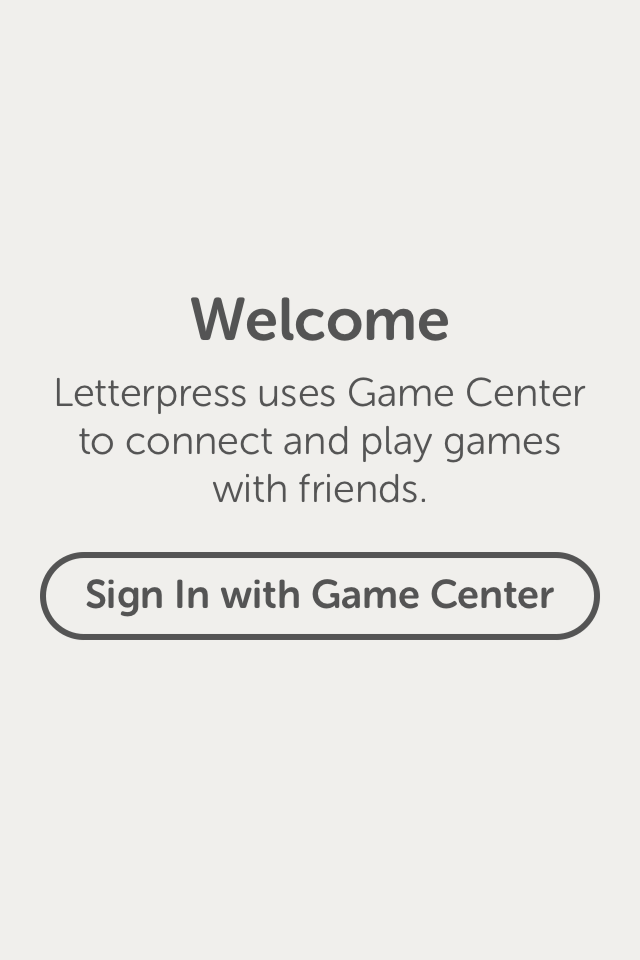
Once you launch the game, you’ll see the welcome screen. You’re only given one option, so click on “Sign In with Game Center:”
## Two
Clicking “Sign in with Game Center” will take you to the Game Center screen, which looks like this:
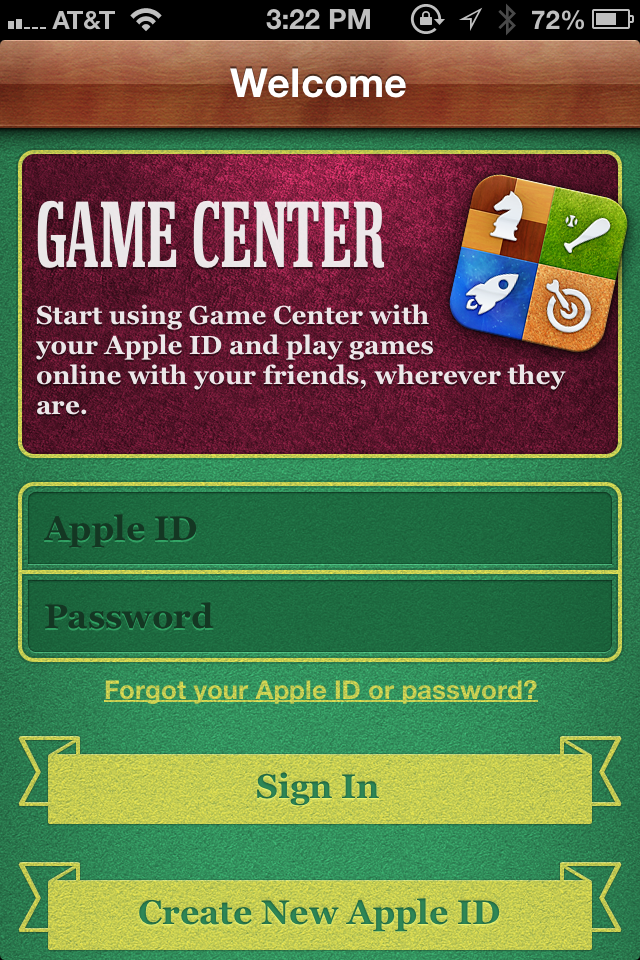
at this screen you want to enter your Apple ID. If you are someone who uses two Apple IDs–one for purchasing and one for iCloud–I would recommend you use your iCloud Apple ID here. After clicking sign in, Game Center will walk you through the process of completing your Game Center sign up. You’ll have to agree to the Terms of Services and you’ll get to pick your Game Center nickname. The Game Center nickname is important because it is one of the ways that people can find out if you are available to play games against.
## Three
Once you’ve completed the Game Center sign up process, you’ll be dumped into the main Game Center page[^fn1] where you can start to add friends. Click on the “Requests” button in the lower right, which will bring you to this screen:
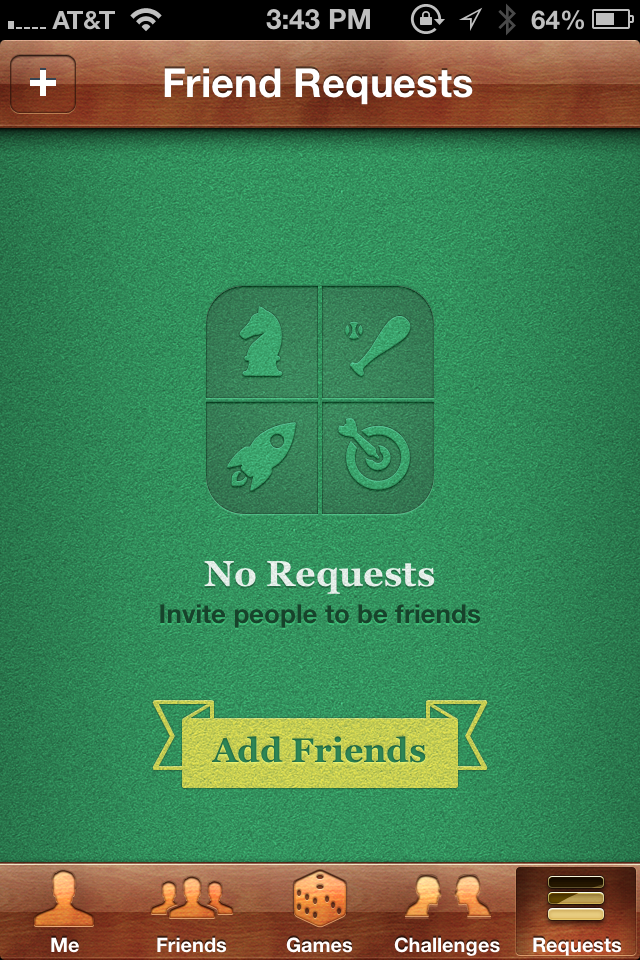
From here you can now click on “Add Friends” to begin the process of adding friends[^fn2].
## Four
In the “Friend Request” screen, type in the email address or the “nickname” of the person you want to friend in the “To:” field. For example, if you were trying to friend me, you would type “**games@johnkiv.us**” in the “To:” field. You can change the default message to send out with your friend request. I admit, it looks kind of silly if you do not:

## Five
After you have submitted some friend requests, you have to wait until your friends accept the requests before you can play them in *Letterpress*[^fn3] . Once you start getting the notifications that you friends have accepted your requests, go back and open *Letterpress*. When you are in *Letterpress*, select “New Game”:

This will take you to the Letterpress-Game Center integration screen, where you can choose to either “Invite Friends” or “Play Now.”

If you choose to “Invite Friends”, you’ll be presented with a list of the Game Center friends you setup in the previous steps. If you choose “Play Now,” Game Center will give a random opponent against which to play. Either way, you should be playing an actual game of *Letterpress* in no time. Good luck![^fn4]
[^fn1]: If you are not in the main Game Center Screen because you are either back in Letterpress, at your iPhone’s home screen, etc…then open up Game Center.
[^fn2]: You might notice there is a “Friends” tab on the Game Center screen. This tab lists your current friends and gives you recommendations for new friends. I found that when I was first configuring Game Center, this tab was kind of useless.
[^fn3]: If you want to just play Letterpress against a random opponent, you can do so now. Just follow the rest of the instructions and select “Play Now” instead of “Invite Friends” when you are presented with the option.
[^fn4]: Unless you’re playing me. In that case, worst of luck to you.
BusyCal 2.0 [is now available in the Mac App Store](http://click.linksynergy.com/fs-bin/stat?id=r*bqlTuiXSo&offerid=146261&type=3&subid=0&tmpid=1826&RD_PARM1=https%253A%252F%252Fitunes.apple.com%252Fus%252Fapp%252Fbusycal-2%252Fid567245998%253Fmt%253D12%2526uo%253D4%2526partnerId%253D30)[^f4239]. I have been using the previous version of BusyCal since it was released and cannot imagin going back to Apple’s built-in Calendar application. Whenever someone tells me they are having problems syncing their Mac Calendars with Google Calendar, I tell them the solution is simple: Get BusyCal.
There’s a [30 day trial](http://www.busymac.com/busycal/index.html) for those who want to see what BusyCal can offer.
[^f4239]: Affiliate Link (as is the post link.)
I have been using *Folding Text* for a couple of weeks now and it has become my favorite tool for shorter outlines[^fn1] and longer Markdown documents. It’s [currently available at 40% off in the Mac App Store](http://click.linksynergy.com/fs-bin/stat?id=r*bqlTuiXSo&offerid=146261&type=3&subid=0&tmpid=1826&RD_PARM1=https%253A%252F%252Fitunes.apple.com%252Fus%252Fapp%252Ffoldingtext%252Fid540003654%253Fmt%253D12%2526uo%253D4%2526partnerId%253D30)[^f0743].
[^f0743]: Affiliate Link (as is the post link and the other app-related links in this post.)
[^fn1]: I still use [Omnioutliner](http://click.linksynergy.com/fs-bin/stat?id=r*bqlTuiXSo&offerid=146261&type=3&subid=0&tmpid=1826&RD_PARM1=https%253A%252F%252Fitunes.apple.com%252Fus%252Fapp%252Fomnioutliner-pro%252Fid404647179%253Fmt%253D12%2526uo%253D4%2526partnerId%253D30) for longer, more in-depth outlines
Categories
Marco Arment Releases The Magazine
> There’s room for another category between individuals and major publishers, and that’s where The Magazine sits. It’s a multi-author, truly modern digital magazine that can appeal to an audience bigger than a niche but smaller than the readership of The New York Times. This is what a modern magazine can be, not a 300 MB stack of static page images laid out manually by 100 people.
> The Magazine supports writers in the most basic, conventional way that, in the modern web context, actually seems least conventional and riskiest: by paying them to write. Since I’m keeping production costs low, I’m able to pay writers reasonably today, and very competitively with high-end print magazines in the future if The Magazine gets enough subscribers.
It looks promising. Federico Viticci has [an in-depth review at MacStores](http://feedproxy.google.com/~r/macstories/ad-supported/~3/abCUCYnBa-w/) if you want more information.
Currently hot in my [Fever](http://feedafever.com) instance – **Microsoft Office for iOS to be released in March 2013**
I am torn on this. I was kind of hoping that Office would never be released for iOS and people would simply move away from it as a *de facto* standard for documents. I guess it will be able to “track changes” on my iPad, however[^fn1].
Links related to this:
* [The Verge](http://www.theverge.com/2012/10/10/3483076/office-for-ipad-ios-android-2013)
* [The Next Web](http://thenextweb.com/microsoft/2012/10/10/microsoft-to-launch-office-2013-on-ios-and-android-in-march-2013/)
* [Mashable](http://mashable.com/2012/10/10/microsoft-office-ipad-ios-androi/)
* [iMore](http://tipb.com.feedsportal.com/c/33998/f/616881/s/2454da12/l/0L0Simore0N0Cmicrosoft0Eoffice0Emake0Eits0Eway0Eios/story01.htm)
[^fn1]: Assuming that feature is included.
Mark your calendars.
Categories
Angry Birds – Star Wars
This might be my first ever Angry Birds purchase.
*Tapbots* has released a version of their *Tweetbot* Client for [App.net](http://alpha.app.net), aptly named:*Netbot*. It comes in both [iPhone](http://click.linksynergy.com/fs-bin/stat?id=r*bqlTuiXSo&offerid=146261&type=3&subid=0&tmpid=1826&RD_PARM1=http%253A%252F%252Fitunes.apple.com%252Fus%252Fapp%252Fnetbot-for-iphone-app.net%252Fid563595132%253Fmt%253D8%2526uo%253D4%2526partnerId%253D30)[^f5409] and [iPad](http://click.linksynergy.com/fs-bin/stat?id=r*bqlTuiXSo&offerid=146261&type=3&subid=0&tmpid=1826&RD_PARM1=http%253A%252F%252Fitunes.apple.com%252Fus%252Fapp%252Fnetbot-for-ipad-app.net-client%252Fid563596528%253Fmt%253D8%2526uo%253D4%2526partnerId%253D30) versions. Though I have really been enjoying [Felix](http://click.linksynergy.com/fs-bin/stat?id=r*bqlTuiXSo&offerid=146261&type=3&subid=0&tmpid=1826&RD_PARM1=http%253A%252F%252Fitunes.apple.com%252Fus%252Fapp%252Ffelix-for-app.net%252Fid562447652%253Fmt%253D8%2526uo%253D4%2526partnerId%253D30) as an iPhone App.net client, I think I am going switch over to Netbot.
[^f5409]: Affiliate Link (as are all app links in this post.)
Categories
1Password for iOS Updated
It now includes a feature I have wanted since I first got my iPad: a “Passwords” view on iPad for all password generated on Mac or iPhone. [Available in the App Store](http://click.linksynergy.com/fs-bin/stat?id=r*bqlTuiXSo&offerid=146261&type=3&subid=0&tmpid=1826&RD_PARM1=http%253A%252F%252Fitunes.apple.com%252Fus%252Fapp%252F1password-pro%252Fid319898689%253Fmt%253D8%2526uo%253D4%2526partnerId%253D30)[^f2537].
[^f2537]: Affiliate Link (as is the post link.)
Currently hot in my [Fever](http://feedafever.com) instance – **All Apple and Google Maps All the Time**[^fn1]
Links related to this:
* [John Gruber](http://daringfireball.net/2012/09/timing_of_apples_map_switch)
* [The Verge](http://www.theverge.com/2012/9/25/3407614/apple-over-a-year-left-on-google-maps-contract-google-maps-ios-app)
* [The Next Web](http://thenextweb.com/apple/2012/09/27/why-so-surveyous/)
* [AllThingsD](http://allthingsd.com/20120926/apple-google-maps-talks-crashed-over-voice-guided-directions/)
[^fn1]: The first 5 *hot* blocks are all related to Apple and Google Maps
Categories
PDFpen for iPhone Released
Smile Software has just released [PDFpen for iPhone](http://click.linksynergy.com/fs-bin/stat?id=r*bqlTuiXSo&offerid=146261&type=3&subid=0&tmpid=1826&RD_PARM1=http%253A%252F%252Fitunes.apple.com%252Fus%252Fapp%252Fpdfpen-for-iphone%252Fid557705455%253Fmt%253D8%2526uo%253D4%2526partnerId%253D30) to compliment their their existing [PDFpen for iPad](http://click.linksynergy.com/fs-bin/stat?id=r*bqlTuiXSo&offerid=146261&type=3&subid=0&tmpid=1826&RD_PARM1=httpWednesday397397itunes.apple.com397us397app397pdfpen397id490774625397mt?8?o?4AMartnerId?30) and [PDFen for Mac](http://click.linksynergy.com/fs-bin/stat?id=r*bqlTuiXSo&offerid=146261&type=3&subid=0&tmpid=1826&RD_PARM1=httpWednesday973973itunes.apple.com973us973app973pdfpenpro-for-mac973id403758325973mt?12?o?4AMartnerId?30) ecosystem of PDF editing apps. I love the family of PDFpen apps, to the point that I uninstalled the company provided copy of Adobe Acrobat that I had on my laptop[^fn1]. I do all of my PDF manipulation in these apps.
You can get [all of the details of the latest iPhone release on Smile Software’s site](http://smilesoftware.com/PDFpen/iPhone/index.html). Also, as become tradition for PDFpen releases, there is a [David Sparks screencast about the application](http://screencasts.smilesoftware.com/PDFpen%20for%20iPhone%20960%20Web%20-%20high.mov).
[^f5452]: Affiliate Link (as are all application links in this post.)
[^fn1]: I also uninstalled it because every time I tried to update the application it would try make Acrobat Reader my default PDF viewing application.
[Spoonbill](http://click.linksynergy.com/fs-bin/stat?id=r*bqlTuiXSo&offerid=146261&type=3&subid=0&tmpid=1826&RD_PARM1=http%253A%252F%252Fitunes.apple.com%252Fus%252Fapp%252Fspoonbill-for-app.net%252Fid553799155%253Fmt%253D8%2526uo%253D4%2526partnerId%253D30)[^f5053] is finally out of beta, and it is amazing. If you use [App.net](http://alpha.app.net), you are going to want to pick this up.
[^f5053]: Affiliate Link (as is the main link on this post.)
Currently hot in my [Fever](http://feedafever.com) instance – **Google chairman confirms no new iOS Maps app is waiting in the wings**
Links related to this:
* [TUAW](http://feeds.tuaw.com/click.phdo?i=1d74017797f63cde33ef841e8da94835)
* [Ars Technica](http://arstechnica.com/apple/2012/09/google-says-no-plans-for-ios-6-mapping-app-yet/)
* [The Loop](http://www.reuters.com/article/2012/09/25/us-google-iphone-idUSBRE88O07U20120925)
* [The Next Web](http://thenextweb.com/apple/2012/09/25/google-hasnt-submitted-maps-app-app-store-yet/)
[Poster](http://click.linksynergy.com/fs-bin/stat?id=r*bqlTuiXSo&offerid=146261&type=3&subid=0&tmpid=1826&RD_PARM1=http%253A%252F%252Fitunes.apple.com%252Fus%252Fapp%252Fposter-wordpress-blog-editor%252Fid549006481%253Fmt%253D8%2526uo%253D4%2526partnerId%253D30)[^f5818] is my favorite way to update this site. It supports Markdown, [TextExpander Touch](http://click.linksynergy.com/fs-bin/stat?id=r*bqlTuiXSo&offerid=146261&type=3&subid=0&tmpid=1826&RD_PARM1=httpThursday662662itunes.apple.com662us662app662textexpander662id326180690662mt?8?o?4PMartnerId?30) text expansion and just feels good to use. I highly recommend it.
[^f5818]: Affiliate Link (as is the post link).
[Ben Brooks](http://brooksreview.net/2012/09/retinizer/):
> I just used it to force Word 2008 to show retina text in Word documents instead of pixelated crap — it worked. What a simple little app that works well (note [do] not to use it on Adobe apps)
Sounds like a winner.
(via [Ben Brooks](http://brooksreview.net/2012/09/retinizer/), obviously)
Categories
Google Acquires Nik Software
The key asset in the deal appears to be Nik’s iOS photo app [Snapseed](http://click.linksynergy.com/fs-bin/stat?id=r*bqlTuiXSo&offerid=146261&type=3&subid=0&tmpid=1826&RD_PARM1=http%253A%252F%252Fitunes.apple.com%252Fus%252Fapp%252Fsnapseed%252Fid439438619%253Fmt%253D8%2526uo%253D4%2526partnerId%253D30)[^f5756]. My main concern, however, is what does this mean for the future of Nik’s professional-level plugins for Apeture and Lightroom? If Google starts killing off these plugins, today could be remembered as a very dark day for photo processing software.
[^f5756]: Affiliate Link.
Like [Omnifocus for iPad](http://click.linksynergy.com/fs-bin/stat?id=r*bqlTuiXSo&offerid=146261&type=3&subid=0&tmpid=1826&RD_PARM1=httpMonday305305itunes.apple.com305us305app305omnifocus-for-ipad305id383804552305mt?8?o?4AMartnerId?30)[^f2115], [Omnifocus for iPhone](http://click.linksynergy.com/fs-bin/stat?id=r*bqlTuiXSo&offerid=146261&type=3&subid=0&tmpid=1826&RD_PARM1=httpMonday536536itunes.apple.com536us536app536omnifocus-for-iphone536id284885288536mt?8?o?4AMartnerId?30) also just got [TextExpander Touch](http://click.linksynergy.com/fs-bin/stat?id=r*bqlTuiXSo&offerid=146261&type=3&subid=0&tmpid=1826&RD_PARM1=httpMonday744744itunes.apple.com744us744app744textexpander744id326180690744mt?8?o?4AMartnerId?30) support. This addition alone makes this a huge update in my book.
[^f2115]: Affiliate Link (as are the other app links and the post link.)
Categories
Omnifocus for iPad Updated
[Omnifocus for iPad](http://click.linksynergy.com/fs-bin/stat?id=r*bqlTuiXSo&offerid=146261&type=3&subid=0&tmpid=1826&RD_PARM1=httpMonday270270itunes.apple.com270us270app270omnifocus-for-ipad270id383804552270mt?8?o?4AMartnerId?30)[^f1248] got an update that includes a key new feature: support for [TextExpander Touch](http://click.linksynergy.com/fs-bin/stat?id=r*bqlTuiXSo&offerid=146261&type=3&subid=0&tmpid=1826&RD_PARM1=http%253A%252F%252Fitunes.apple.com%252Fus%252Fapp%252Ftextexpander%252Fid326180690%253Fmt%253D8%2526uo%253D4%2526partnerId%253D30). I can hear my fellow geeks rejoicing.
[^f1248]: Affiliate Link (as are the other app links and the post link.)
Categories
Diet Coda 1.1 Update
As [explained on MacStories ](http://feedproxy.google.com/~r/macstories/ad-supported/~3/x-4CdE__6RM/), [Diet Coda](http://click.linksynergy.com/fs-bin/stat?id=r*bqlTuiXSo&offerid=146261&type=3&subid=0&tmpid=1826&RD_PARM1=http%253A%252F%252Fitunes.apple.com%252Fus%252Fapp%252Fdiet-coda%252Fid500906297%253Fmt%253D8%2526uo%253D4%2526partnerId%253D30)[^f0733] now offers the ability to upload images from your camera roll to your server via FTP. I am hoping this is finally *the* solution for handling posts with images going forward[^f1006].
[^f1006]: I have really struggled to find something that works well. I had one alternative, however, I could only get it to work via plain FTP. I deciding that trying to increase the security on my server was more important than sticking with that workflow.
[^f0733]: Affiliate Link (as is the post link).