Just reading this makes me want to open up my copy of Scrivener and start writing.
Category: Software
Okay, I admit it: I am linking to this almost solely because the animated GIF he used is *amazing.*
(h/t [Shawn Blanc](http://shawnblanc.net))
Federico Viticci breaks down the new document syncing solution from the Omni Group in his usual, comprehensive manner.
I have been really looking forward to the days when I could easily sync my OmniOutliner outlines from my Mac to iPad and it seems that day has finally arrived. Since my OmniSync Server account currently does not support OmniPresence, I followed Federico’s advise and got a free [Cloudsafe](http://cloudsafe.com) account to use with OmniPresence. The Cloudsafe setup process was pretty straight forward, but enabling WebDav was kind of confusing. For reference you need to:
1. Create a new “safe”
2. Give yourself read and write access to that safe via the “access chains”
3. Go to the “Safe Content” for that particular safe and click on the “WebDav” link.[^fn1] That will allow you enable WebDav.
After you get your WebDav login information, you can follow the rest of Federico’s review to get yourself up and running on OmniPresence.
[^fn1]: The link does not look like it will do anything, but, trust me, it will ask you if you want to enable WebDav.
Tim Britton proving once again that the *Providence Journal* has the best Red Sox coverage anywhere.
A really good, level-headed explanation of the pricing changes coming to Photoshop and other Adobe products. I am pretty sure I will be subscribing to Creative Cloud once the new versions of photoshop show up in a couple of weeks.
Categories
Squarespace 5 Workaround for MarsEdit
Squarespace’s lack of solid MarsEdit support is one the reasons I doubt I will ever seriously consider moving to it.
> The worst part about this is that the quality of apps can’t and won’t improve if developers aren’t properly compensated for their time. This worries me the most, that despite my emphasis on paying, in the end it won’t matter because I’m one of the few paying and it won’t be enough to support excellent ad-free apps.
I am with Ben in the group of people more than willing to pay for quality apps. I hope we do not end up in a future where developers are unwilling to create quality apps because people simply refuse to pay more than 99 cents for things.
*NOTE: Lex Friedman’s original article that prompted Ben’s post, [A $5 app isn’t expensive: Customers need to help fix the App Store economy](http://www.macworld.com/article/2032847/a-5-app-isnt-expensive-customers-need-to-help-fix-the-app-store-economy.html), is well worth a read as well.*
I use a number of different online backup services:[Dropbox](http://db.tt/bl7yQBc)[^fn1] and [SpiderOak](https://spideroak.com/)[^fn2] for my current working files, [iTunes Match](https://www.apple.com/itunes/itunes-match/) for my music collection. and [Crashplan](http://www.crashplan.com) for most other files. There are certain things, however, that I want to have in the cloud and be able to access from my other computers[^fn8] and from iOS devices, but–since I access them so infrequently–that would just clog up my Dropbox folder. Now, I put copies of all of those things in my [Bitcasa](http://bitcasa.com) cloud drive.
Bitcasa bills itself [as an external hard drive in the cloud that never runs out of space](https://www.bitcasa.com/how-it-works) and that is exactly how I use it. When the Bitcasa help program is running, you get a new drive in your sidebar that you can use just like any other external hard drive. The “magic” comes in how Bitcasa handles the copying of things to the drive. Basically, it appears that Bitcasa keeps a local cache on your drive[^fn3] that serves as the intermediate destination for things you are copying to the Bitcasa cloud drive. [^fn9]
In theory, this caching mechanism should allow standard OS X copy operations to work just fine. I found that for larger files and directories with a lot of files, however, I had much better luck using [Chronosync](http://www.econtechnologies.com/pages/cs/chrono_overview.html) to sync things to my cloud drive[^fn4]. For anything that did not exhaust the cache, however, standard OS X copies worked flawlessly.
Bitcasa does have some minor flaws. The most annoying is that the helper program that keeps the cloud drive open seems to crash every so often. Also, there seems to be a strange bug with file permissions where files stored on the cloud drive appear in Finder’s “light grey / in-progress” state, but are actually fully accessible[^fn5]. My hope is that these issues get resolved in a future release of the helper program[^fn6].
All in all, Bitcasa does exactly what is says it is designed to do: give me an external hard drive in the cloud. It is not as effortless as Dropbox, and it lacks some of the power of Crashplan, but it allows me to put a ton of files in the cloud and access them easily from my various computer and iOS devices[^fn7]. If you have a similar use case that you are trying to fill, I would definitely recommend giving Bitcasa a try.
[^fn1]: Affiliate Link (The kind where my size goes up if you use it.)
[^fn2]: Traditional Affiliate Link
[^fn3]: You can configure the cache if you like, including the directory that it is stored in, and its size.
[^fn4]: I would assume something like rsync would work well for this too
[^fn5]: I am sure there is an actual name for this state, but I am not sure what it is
[^fn6]: The helper program has been updated pretty regularly so far. I hope that continues. Also, my use of Chronosync has minimized the impact of the helper program crashes
[^fn7]: Bitcasa’s iOS app is kind of basic, but it does what I need it to do: give me access to my files
[^fn8]: The “multiple computer” requirement is why I cannot use Crashplan for this usecase.
[^fn9]: If the size of the stuff you are copying to the cloud drive is smaller than the cache, then the copy operation completes and the stuff is uploaded to the drive in the background. If the copy operation fills up the cache, the operation “holds” until things get uploaded to the cloud to free up space in the cache and then continues copying to the cache as space becomes available.
Earlier this week, Soulmen GBR released an major new update to their text editor: [Ulysses III](http://click.linksynergy.com/fs-bin/stat?id=r*bqlTuiXSo&offerid=146261&type=3&subid=0&tmpid=1826&RD_PARM1=https%253A%252F%252Fitunes.apple.com%252Fus%252Fapp%252Fulysses-iii%252Fid623795237%253Fmt%253D12%2526uo%253D4%2526partnerId%253D30)[^fn1] I did not use the previous versions of Ulysses, but the buzz surrounding this version[^fn2] prompted me to give it a try. I am extremely glad that I did.
Ulysses offers a minimalist Markdown editor, with some basic [Scrivener](http://literatureandlatte.com/scrivener.php)-like project / file management. It also syncs to [Daedalus Touch](http://click.linksynergy.com/fs-bin/stat?id=r*bqlTuiXSo&offerid=146261&type=3&subid=0&tmpid=1826&RD_PARM1=https%253A%252F%252Fitunes.apple.com%252Fus%252Fapp%252Fdaedalus-touch-text-editor%252Fid406964546%253Fmt%253D8%2526uo%253D4%2526partnerId%253D30) on iOS. Basically, it gives me the Markdown editing I was using [iA Writer](http://click.linksynergy.com/fs-bin/stat?id=r*bqlTuiXSo&offerid=146261&type=3&subid=0&tmpid=1826&RD_PARM1=https%253A%252F%252Fitunes.apple.com%252Fus%252Fapp%252Fia-writer%252Fid392502056%253Fmt%253D8%2526uo%253D4%2526partnerId%253D30) for and the document management I missed while I was not using Scrivener. I am really, really liking it.
That said, I am making this post before really putting the app through it’s paces to make sure potential purchasers can take advantage of it’s current introductory sale.[^fn3] Thankfully, there are a lot of good write-ups about the the update, including:
* [Ben Brooks](http://brooksreview.net/2013/04/ulysses-iii/) – This is the review that convinced me to give Ulysses a shot. Since he said he replaced iA Writer with it, I figured that it would work for me.
* [Brett Terpstra](http://brettterpstra.com/2013/04/03/mac-app-review-ulysses-iii/)
* [Gabe Weatherhead](http://www.macdrifter.com/2013/04/ulysses-3.html) – *NOTE: Gabe seems to have beaen considering Ulysses as replacement for his directory of text files / [nvAlt](http://brettterpstra.com/projects/nvalt/). This is different than my use case, where I use Ulysses for documents I am drafting.*
* [David Sparks](http://macsparky.com/blog/2013/4/looking-at-ulysses-iii) – *Same comments as the Gabe Weatherhead review*
If you are on the fence, I encourage you to read some of the reviews and decide if Ulysses is a good fit for you.
[^fn1]: Affiliate Link (as is the post link and the other links to apps in this post)
[^fn2]: I will get to that buzz in a second
[^fn3]: It’s currently $19.99, but is expected to go up to $39.99
I previously posted an (https://johnkiv.us/2013/01/23/clearing-flipboard-image-cache-on-ios/). Unfortunately, that procedure is no longer valid in Flipboard 2. Fortunately, the new procedure is much, much simpler:
1. Tap the red bookmark / ribbon thing in the upper right corner.
2. Tap on the gear icon in the upper right of the “My Flipboard” panel the slides out.
3. Choose “Settings” from the popup menu.
4. Scroll down to and tap “Clear Cache” at the bottom of the settings window.
That should do it.[^f2017].
[^f2017]: Be warned, the cache clearing process appears to take a long, long time.
Smile Software has released [PDFPen Pro 6](http://click.linksynergy.com/fs-bin/stat?id=r*bqlTuiXSo&offerid=146261&type=3&subid=0&tmpid=1826&RD_PARM1=https%253A%252F%252Fitunes.apple.com%252Fus%252Fapp%252Fpdfpenpro-6%252Fid609313570%253Fmt%253D12%2526uo%253D4%2526partnerId%253D30)[^f5946], an update their PDF editing application for the Mac. At $40 (which is 50% off the normal price) it’s a no-brainer for anyone who uses PDFs on his or her Mac.
[^f5946]: Affiliate Link (as is the post link).
This article could not be better timed (from my point of view.) I have been been trying to decide if I should invest in one of these utilities in order to fix a drive problem I am having, and this article helped a ton[^fn1].
[^fn1]: SPOILER: I’m buying DiskWarrior
Daniel Jalkut told me about this tip years ago, and I use it quite frequently. I can imagine a lot of people who use MarsEdit, however, do not even know it is possible.
Michael has mixed results during his initial tests of Manton’s [new site-specific search](http://searchpath.io/). I like *Searchpath* conceptually, but I am not quite ready to [switch over from my Sphider](http://search.johnkiv.us) installation.[^fn1] That said, if I did not already have my [Sphider](http://www.sphider.eu) installation running, I would probably have used Searchpath for my site’s search functionality.
[^fn1]: If anything, I think Searchpath’s launch has motivated me to better integrate my search into the rest of my site.
Categories
OmniGroup’s Plans for 2013
Omnifocus 2 for Mac will make its public debut on January 31st at Macworld, Omnioutliner 4 is scheduled for release in Q1 of 2013, and OmniPresence will allow syncing across the Omni apps and other apps. It should be a really big start of the year for the OmniGroup. Also interesting is their approach to the Mac App Store and upgrade pricing:
> Finally, with OmniFocus 2 coming we’ve been thinking a lot about how to implement upgrade pricing from Mac App Store apps. As always, we plan to offer discounted upgrade pricing on our own online store, but unfortunately we don’t have that flexibility in the Mac App Store. We’ve decided to treat the Mac App Store the same way as we treat retail stores: it’s a great way to discover our software, and can give you confidence that it’s been vetted by a third party. And, just as you wouldn’t get a discount from a retail store if you purchase OmniGraffle 5 while owning OmniGraffle 4, you won’t get a discount if you purchase OmniFocus 2 from the Mac App Store. But we’re in the process of updating our store so that you’ll be able to register your Mac App Store apps to get a discounted upgrade price when you buy an update directly from us.
Interesting. I wonder if other Mac developers will follow Omni’s lead in that approach.
A really, really good piece from the guys over at *Polygon.* It shows how much actually goes into making those like $2-3 “downloadable content” add-ons that are available for music games.
I love [Folding Text](https://itunes.apple.com/us/app/foldingtext/id540003654?mt=12)[^f3430]. Try this [Macworld](http://www.macworld.com/article/2013699/mac-gems-foldingtext-is-a-unique-and-versatile-text-editor.html) review if you want to see if it’s a good fit for you.
[^f3430]: Affiliate Link.
[Letterpress](http://click.linksynergy.com/fs-bin/stat?id=r*bqlTuiXSo&offerid=146261&type=3&subid=0&tmpid=1826&RD_PARM1=https%253A%252F%252Fitunes.apple.com%252Fus%252Fapp%252Fletterpress-word-game%252Fid526619424%253Fmt%253D8%2526uo%253D4%2526partnerId%253D30), a new game by [Loren Brichter](http://www.macstories.net/msinterviews/a-conversation-with-loren-brichter/), has been all the buzz today. Though the game is a blast to play, I found that it can be a little confusing to to work through the initial GameCenter signup required to actually play the game against your friends. Here are the steps I went through:
## One
Once you launch the game, you’ll see the welcome screen. You’re only given one option, so click on “Sign In with Game Center:”

## Two
Clicking “Sign in with Game Center” will take you to the Game Center screen, which looks like this:
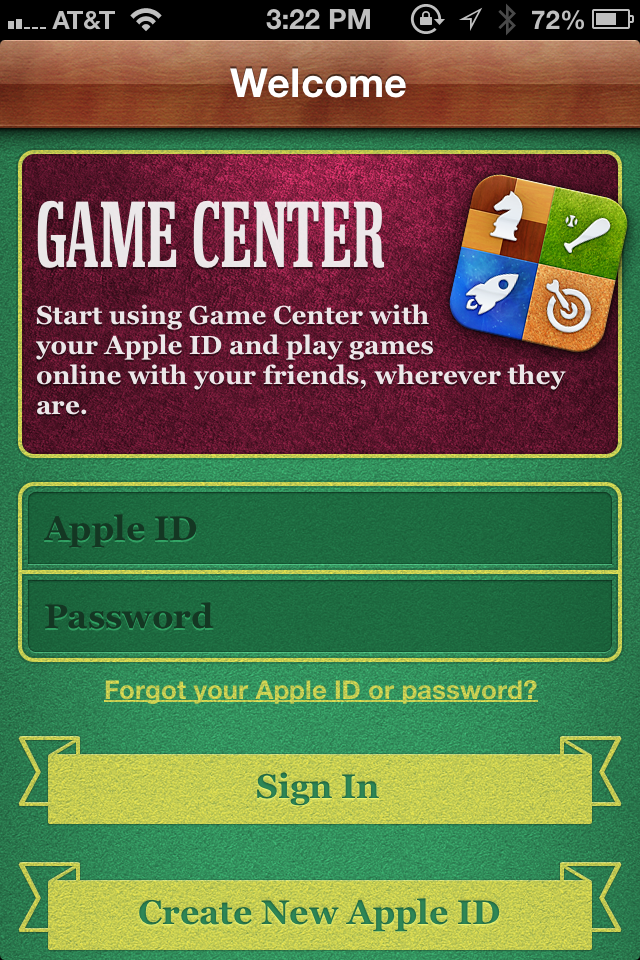
at this screen you want to enter your Apple ID. If you are someone who uses two Apple IDs–one for purchasing and one for iCloud–I would recommend you use your iCloud Apple ID here. After clicking sign in, Game Center will walk you through the process of completing your Game Center sign up. You’ll have to agree to the Terms of Services and you’ll get to pick your Game Center nickname. The Game Center nickname is important because it is one of the ways that people can find out if you are available to play games against.
## Three
Once you’ve completed the Game Center sign up process, you’ll be dumped into the main Game Center page[^fn1] where you can start to add friends. Click on the “Requests” button in the lower right, which will bring you to this screen:

From here you can now click on “Add Friends” to begin the process of adding friends[^fn2].
## Four
In the “Friend Request” screen, type in the email address or the “nickname” of the person you want to friend in the “To:” field. For example, if you were trying to friend me, you would type “**games@johnkiv.us**” in the “To:” field. You can change the default message to send out with your friend request. I admit, it looks kind of silly if you do not:

## Five
After you have submitted some friend requests, you have to wait until your friends accept the requests before you can play them in *Letterpress*[^fn3] . Once you start getting the notifications that you friends have accepted your requests, go back and open *Letterpress*. When you are in *Letterpress*, select “New Game”:

This will take you to the Letterpress-Game Center integration screen, where you can choose to either “Invite Friends” or “Play Now.”

If you choose to “Invite Friends”, you’ll be presented with a list of the Game Center friends you setup in the previous steps. If you choose “Play Now,” Game Center will give a random opponent against which to play. Either way, you should be playing an actual game of *Letterpress* in no time. Good luck![^fn4]
[^fn1]: If you are not in the main Game Center Screen because you are either back in Letterpress, at your iPhone’s home screen, etc…then open up Game Center.
[^fn2]: You might notice there is a “Friends” tab on the Game Center screen. This tab lists your current friends and gives you recommendations for new friends. I found that when I was first configuring Game Center, this tab was kind of useless.
[^fn3]: If you want to just play Letterpress against a random opponent, you can do so now. Just follow the rest of the instructions and select “Play Now” instead of “Invite Friends” when you are presented with the option.
[^fn4]: Unless you’re playing me. In that case, worst of luck to you.
Categories
Review of Daniel Bard’s Season
> In the end, Daniel Bard’s performance in 2012 doesn’t hold a candle to some of the truly awful years we’ve seen out of players in the past. John Lackey’s 2011 alone makes it seem almost irrelevant. But put in context, this disaster may be one for the ages if we don’t see something different out of him in 2013.
Daniel Bard flaming out as a starter made this horrible Red Sox season just that much worse. I really hope he can pull things together next year. Maybe John Farrell coming back will give him some help.
BusyCal 2.0 [is now available in the Mac App Store](http://click.linksynergy.com/fs-bin/stat?id=r*bqlTuiXSo&offerid=146261&type=3&subid=0&tmpid=1826&RD_PARM1=https%253A%252F%252Fitunes.apple.com%252Fus%252Fapp%252Fbusycal-2%252Fid567245998%253Fmt%253D12%2526uo%253D4%2526partnerId%253D30)[^f4239]. I have been using the previous version of BusyCal since it was released and cannot imagin going back to Apple’s built-in Calendar application. Whenever someone tells me they are having problems syncing their Mac Calendars with Google Calendar, I tell them the solution is simple: Get BusyCal.
There’s a [30 day trial](http://www.busymac.com/busycal/index.html) for those who want to see what BusyCal can offer.
[^f4239]: Affiliate Link (as is the post link.)